
ThreatMap API: Map IP Threats in One Call
Render hostnames, IPv4 addresses, or IPv6 addresses on a shareable threat map for incident reports, customer portals, and security dashboards.
If you can POST a JSON payload, you can render a ThreatMap.
FraudGuard’s ThreatMap Render API is designed for fast integration: submit hostnames, IPv4 addresses, or IPv6 addresses, then get back a ready-to-share URL and an embed URL.
Review the ThreatMap Render API documentation →
Check the current pricing and feature availability before production integration.
Why This Is So Easy to Integrate
This endpoint does the heavy lifting for you:
- Geolocation and plotting
- Threat context visualization
- Optional summary panel
- Hosted map URL + iframe embed URL
You call one endpoint:
POST https://api.fraudguard.io/api/v1/threatmap/render
And receive a complete map response with links you can immediately use.
Request Payload (Your Main Controls)
Here is the exact request body:
{
  "ips": ["1.20.97.181", "fraudguard.io", "212.102.51.14", "82.25.3.7"],
  "theme": "dark",
  "summary_panel": true,
  "ttl_seconds": 3600
}
What each option does:
ips: The hostnames, IPv4 addresses, and/or IPv6 addresses you want plotted.theme: Supports bothlightanddark.summary_panel: Supports bothtrueandfalse.ttl_seconds: Controls how long the rendered ThreatMap stays accessible.
You can mix hostname, IPv4, and IPv6 values in the same request.
ttl_seconds is especially important for sharing and security.
The URL is randomly generated and remains accessible until TTL expiration.
You can also track expiration directly from expires_at in the response.
Example Render Output
Sample response:
{
  "threatmap_id": "tm_255e3f3779edae10bb2629e9579d8267595c38af4b1f266005cf58a2a95fbb5e",
  "threatmap_url": "https://api.fraudguard.io/threatmap/tm_255e3f3779edae10bb2629e9579d8267595c38af4b1f266005cf58a2a95fbb5e",
  "embed_url": "https://api.fraudguard.io/threatmap/tm_255e3f3779edae10bb2629e9579d8267595c38af4b1f266005cf58a2a95fbb5e/embed",
  "expires_at": "2026-01-03T07:06:21+00:00",
  "requested_count": 4,
  "plotted_count": 4,
  "unmapped_count": 0,
  "options": {
    "theme": "dark",
    "summary_panel": true,
    "ttl_seconds": 3600
  },
  "summary": {
    "countries": 3,
    "top_threats": [
      {
        "threat": "unknown",
        "count": 2
      },
      {
        "threat": "anonymous_tracker",
        "count": 1
      },
      {
        "threat": "spam_tracker",
        "count": 1
      }
    ],
    "policy_counts": {
      "whitelisted": 0,
      "blacklisted": 0,
      "geoblocked": 0
    }
  }
}
What makes this useful in practice:
threatmap_url: Open and share instantly.embed_url: Drop directly into your internal admin tools.requested_count,plotted_count,unmapped_count: Quick health check on your input list.summary: Immediate top-level intelligence for analysts.
Account-Aware Context on the Map
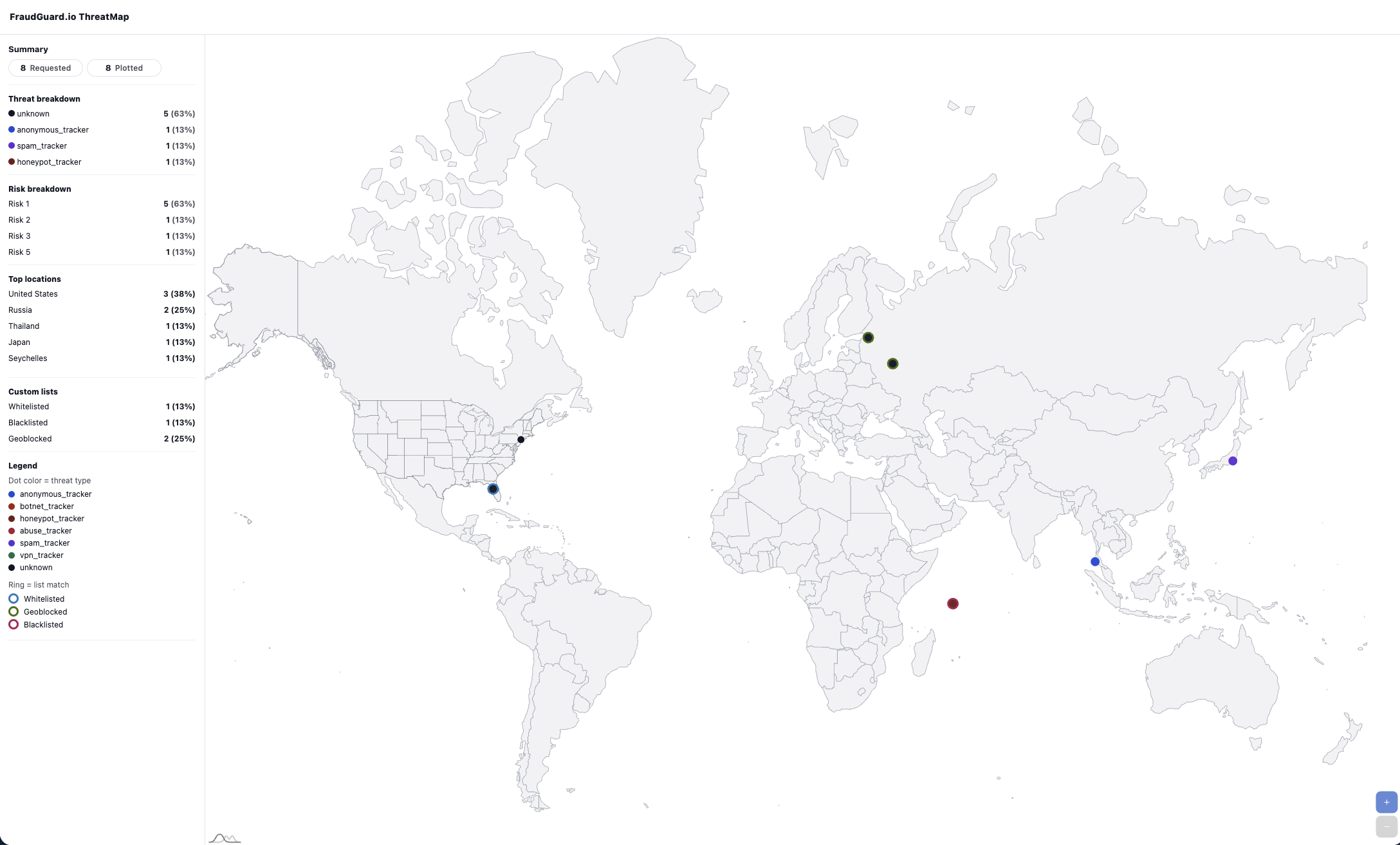
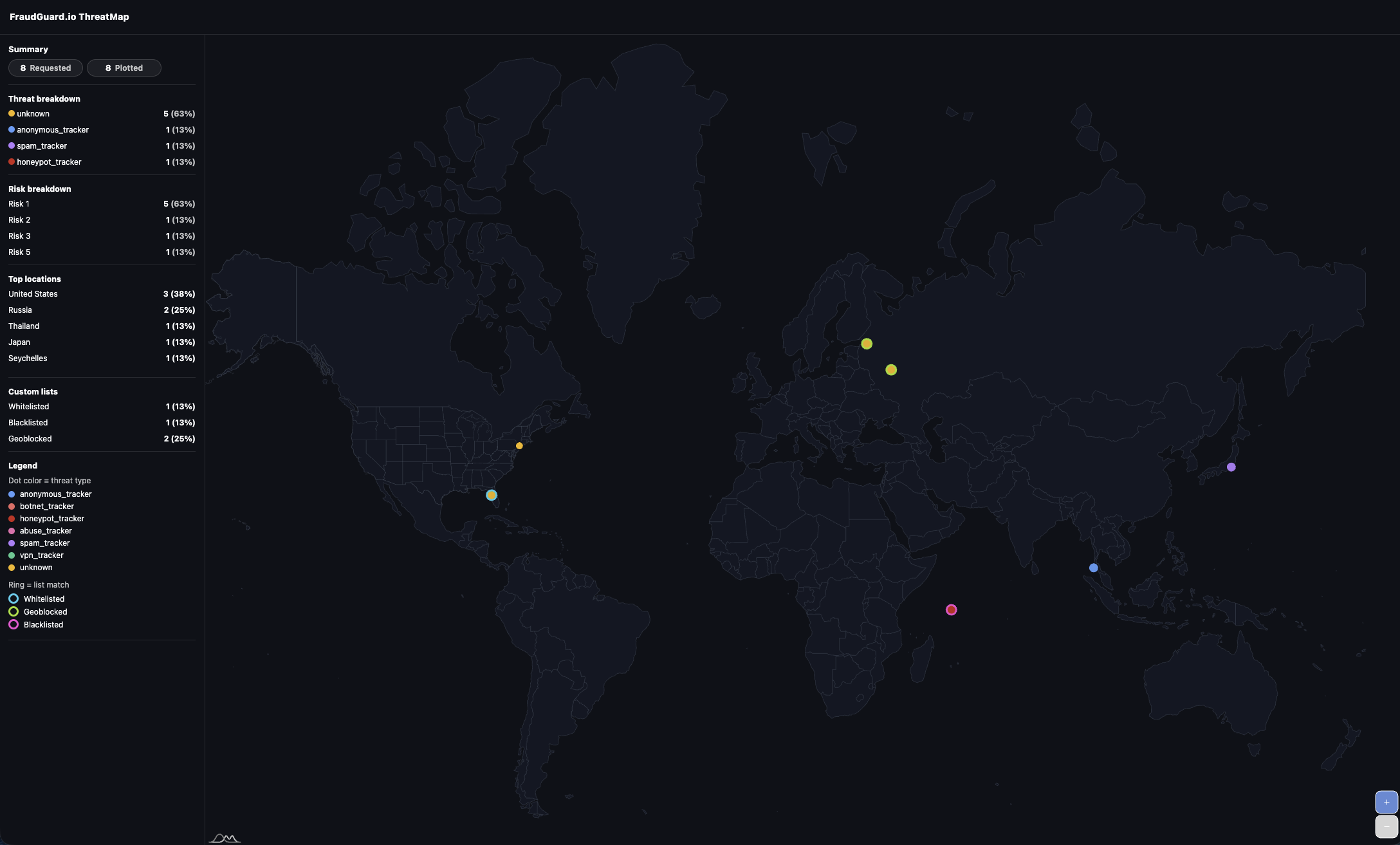
ThreatMap plotting includes context from your FraudGuard.io account data, including custom list and policy signals.
That includes data points tied to:
- Customer geolocation blocks (
geoblocked) - Customer whitelist matches (
whitelisted) - Customer blacklist matches (
blacklisted)
This gives your team a map that is not just geographic, but policy-aware.
Theme and Summary Panel Examples
Light and dark themes are both supported. The summary panel can be enabled or disabled based on your use case.
Embed in Any Dashboard
Use the embed URL directly in an iframe:
<iframe
  src="https://api.fraudguard.io/threatmap/{THREATMAP_ID}/embed"
  width="100%"
  height="600"
  style="border:0"
  loading="lazy"
  referrerpolicy="no-referrer"
  allowfullscreen>
</iframe>
Replace {THREATMAP_ID} with the threatmap_id returned by the API (or use embed_url directly from the response).
Minimal Integration Flow
- Send
POST /api/v1/threatmap/renderwith your IP list and options. - Read
threatmap_url/embed_urlfrom the response. - Share the URL or embed it in your SOC/admin tooling.
That’s it. No map hosting, no tile rendering work, and no front-end visualization framework required.
Need help integrating ThreatMap Render into your workflow? Reach out at hello@fraudguard.io.
Put the evidence to work
Turn an IP signal into a defensible decision.
Investigate a source with FraudGuard, then bring explainable allow, challenge, and block decisions into your own request path.